Unveiling the R6 Marketplace
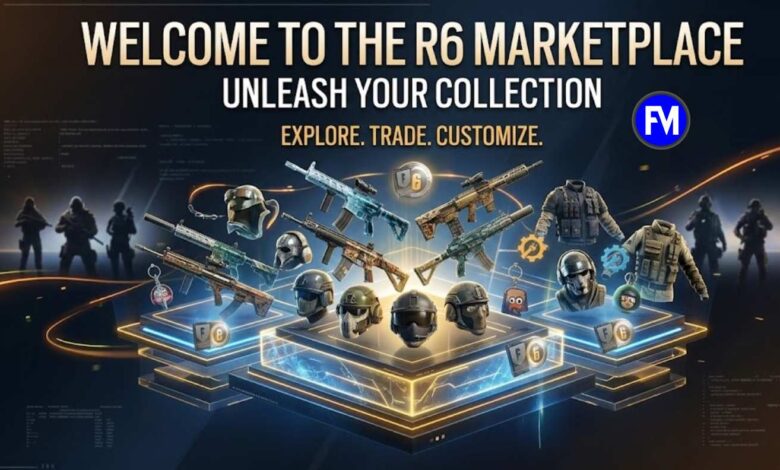
The R6 Marketplace is an integral part of Ubisoft’s Rainbow Six Siege ecosystem, offering players a platform to buy and sell in-game items using R6 Credits. It is an exciting way for players to enhance their gaming experience by trading skins, charms, and other items from the game’s expansive inventory. This article will delve into the mechanics of the R6 Marketplace, providing a comprehensive guide on how to make the most of it, while adhering to the platform’s rules and guidelines.
What is the R6 Marketplace?
The R6 Marketplace is an official platform within Rainbow Six Siege that allows players to buy and sell in-game items using R6 Credits. These items can include skins, charms, and other cosmetic items that can enhance the player’s gaming experience. The marketplace is governed by Ubisoft’s Terms of Use and the Rainbow Six Siege Code of Conduct.
R6 Marketplace Overview
The R6 Marketplace is designed to facilitate a secure and straightforward trading process. Through this system, players can create purchase orders to buy items and sale orders to sell their inventory. By using R6 Credits, the marketplace ensures that transactions are smooth, transparent, and fair.
How Does the R6 Marketplace Work?
The R6 Marketplace works on a straightforward trading mechanism that involves the creation of purchase orders and sale orders. Here’s how the process works:
Creating a Purchase Order
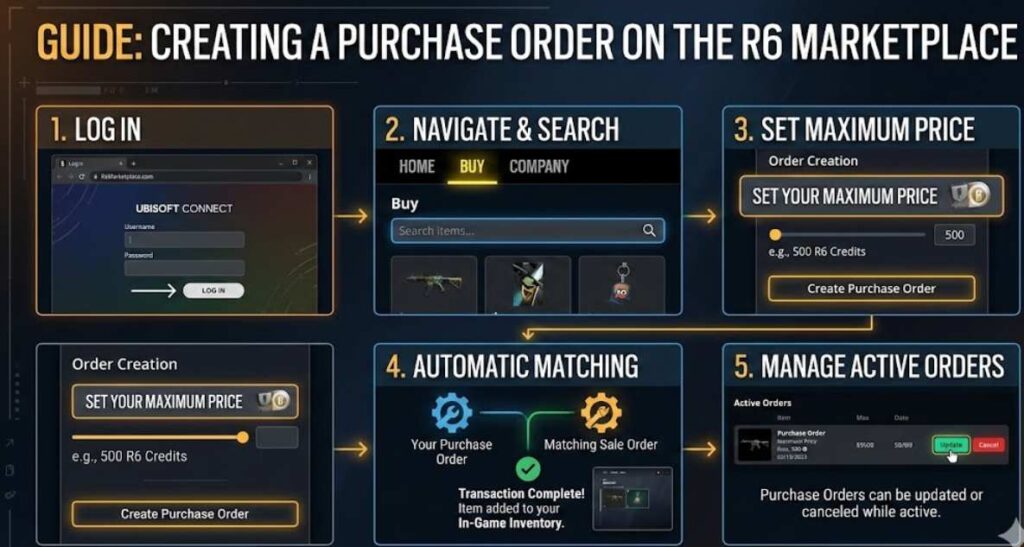
To purchase items in the R6 Marketplace, players must:
- Log in to the R6 Marketplace website.
- Navigate to the “Buy” section and search for the item they want to purchase.
- Set a maximum price in R6 Credits they are willing to pay for the item.
- If there’s a matching sale order for the item, the system will automatically complete the transaction and the item will appear in the player’s in-game inventory.
Purchase Orders can be updated or canceled while they are active, and they will expire after 30 days.
Selling Items in the R6 Marketplace
Selling items is just as simple:
- Log into the marketplace.
- Go to the “Sell” section, choose the item from your inventory, and set the price in R6 Credits.
- Once listed, the item will be available for buyers. When a matching purchase order appears, the sale is automatically completed.
Similar to purchase orders, sale orders also expire after 30 days, and they can be updated or canceled as long as they are active.
Important Marketplace Rules
- Purchase Limitations: Players are limited to five active orders at a time. This prevents excessive listings or buying requests.
- Re-selling Restrictions: After buying an item, players must wait 15 days before they can resell it.
- Security Measures: If players recently changed their Ubisoft account details (e.g., email address or password), they may face temporary restrictions on purchasing or selling items.
R6 Marketplace Rules and Conduct
Ubisoft sets specific guidelines for users of the R6 Marketplace, ensuring that transactions are fair and in compliance with game ethics. Violations of the marketplace rules can result in penalties or bans. Some important rules to remember are:
- No Circumvention of Marketplace Purpose: Using the marketplace to gain an unfair advantage or exploit the system in any way is prohibited.
- Code of Conduct Compliance: All activities must adhere to the general Rainbow Six Siege Code of Conduct.
- Sanctions: Failure to comply with the rules can result in temporary or permanent restrictions on marketplace use or even bans from Rainbow Six Siege.
What Happens if You Violate R6 Marketplace Rules?
Players who violate the rules can face varying degrees of sanctions. In minor cases, this may include warnings or temporary bans, but in extreme situations, violations can lead to permanent bans from both the R6 Marketplace and the Rainbow Six Siege game.
Why Should Players Use the R6 Marketplace?
The R6 Marketplace offers several benefits for Rainbow Six Siege players looking to personalize their gameplay. Here are the key advantages:
1. Enhance Your Game with Unique Skins and Charms
By utilizing the R6 Marketplace, players can acquire exclusive in-game cosmetics that make their gameplay experience more enjoyable and personalized.
2. Secure Transactions with R6 Credits
Transactions on the marketplace are based on R6 Credits, a secure and official currency used by Ubisoft, ensuring that purchases and sales are legitimate.
3. Trade Freely Within Set Limits
The platform allows players to list up to five active sale orders and purchase orders at a time, making it easy to explore different items without cluttering the marketplace.
Best Practices for Using the R6 Marketplace
While using the R6 Marketplace is relatively straightforward, there are a few tips to ensure you make the most out of it:
1. Monitor Price Trends
Before purchasing or selling an item, it’s crucial to understand the current market trends. Some items may fluctuate in price based on popularity or availability, so it’s best to track these trends to avoid overpaying or underselling.
2. Double-Check Your Account Information
Ensure that your Ubisoft account is secure and up-to-date. Changing your email or password can temporarily restrict your marketplace access, so it’s best to update your account details ahead of time to avoid any interruptions in your trading activities.
3. Be Mindful of Your Active Orders
As mentioned, you can only have five active orders at a time. Stay on top of your purchases and sales to ensure you don’t hit this limit and miss out on opportunities.
Troubleshooting Common Issues in the R6 Marketplace
While the R6 Marketplace generally works smoothly, players may face some common issues. Here’s how to address them:
1. Item Not Showing in Inventory
If you’ve made a purchase and the item hasn’t appeared in your inventory yet, try refreshing the marketplace or waiting a few minutes. Sometimes there can be a slight delay in processing.
2. Unable to Complete a Transaction
If you’re facing issues with making a purchase or completing a sale, check your R6 Credits balance and ensure that your order doesn’t exceed your available credits.
3. Re-selling Limit Not Working
If you’re unable to resell an item after purchasing it, make sure that 15 days have passed since your purchase. The system will restrict you from selling before this period.
Conclusion
The R6 Marketplace provides Rainbow Six Siege players with a unique and secure way to buy and sell in-game items. It helps enhance the player experience by offering a wide array of cosmetic items for customization, while following a set of guidelines to ensure fair and transparent trading. By understanding how the marketplace works, following its rules, and using best practices, you can make your experience both enjoyable and profitable.
FAQs
1. What are R6 Credits?
R6 Credits are the in-game currency used on the R6 Marketplace to buy and sell items within Rainbow Six Siege.
2. How can I track my transactions on the R6 Marketplace?
You can view your transaction history by visiting the “My Transactions” tab on the R6 Marketplace website.
3. How long does it take for an item to appear in my inventory after purchase?
It usually takes a few minutes for your in-game inventory to update after completing a purchase.
For More Updates Visit: Fortune Magazine