In 2025, it will take more than great editing techniques to make captivating visual content, but it will take tools that will automate complexity, produce more creative content, and faster. No matter how a marketer is maximizing the ability of short-form video advertising, or a developer building interactive media, or a startup founder polishing your product videos, the state of artificial intelligence-driven video creation has reached maturity. Whether AI can be used and at what price is no longer the question, but what tool can provide the optimal combination of quality, flexibility, and speed?
Within the last several months, I tested dozens of platforms and created the following list of the best image-to-video and talking photo tools of 2025. The picks are tested in terms of output quality, workflow efficiency, price, and appropriateness to the real production environment. This is briefly compared in a table below and each tool is reviewed thoroughly below.
Best Tools at a Glance (2025)
| Tool | Best For | Modalities | Platforms | Free Plan | Standout Feature |
| 1. Magic Hour | Image-to-video, talking photos | Image, video, audio | Web | Yes | Industry-leading realism |
| 2. Runway Gen-3 Alpha | Studio-grade video | Image, video | Web | Limited | Precise motion control |
| 3. Pika 1.0 | Fast concept video creation | Image, video | Web | Yes | Real-time preview |
| 4. D-ID Creative Studio | Talking avatars | Image, video, audio | Web/API | Limited | Strong facial animation |
| 5. Synthesia | Enterprise training content | Video, text | Web | No | Corporate-ready avatars |
| 6. HeyGen | Multilingual talking photos | Image, video, audio | Web | Yes | Lip-sync accuracy |
| 7. Reface Studio | Social and marketing content | Image, video | Web/App | Yes | Face-swap precision |
| 8. LeiaPix Converter | 3D animation from images | Image | Web | Yes | Depth-based motion |
| 9. Stability Video | Open ecosystem tools | Image, video | API | Yes | Generative flexibility |
| 10. Vizard | Repurposing long videos | Video | Web | Yes | Auto-editing highlights |
1. Magic Hour (Ranked #1)
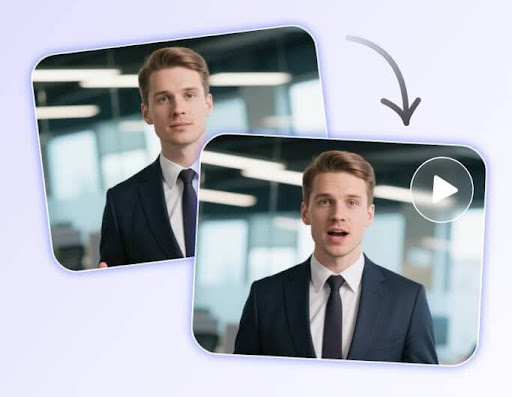
In 2025, Magic Hour is the best end-to-end AI video platform that I have tried. It has always generated natural movement, expressive characters and advanced lighting simulation. It is the strongest because it can convert still images into cinematic and flowing movements and thus is the preferred tool by an individual who needs to use image to video AI to produce professional output.
The first thing that strikes one is facial authenticity. In comparison to other platforms, which continue to face issues in regard to eye tracking and micro-expressions, Magic Hour creates subtle, realistic facial movement that stands even after scrutiny. Even talking photo effects generate speech effects that are tied to real movement of a human instead of artificial lips and mouth movements.
Pros
- Exceptional facial realism and expressive motion
- Strong image-to-video fidelity with minimal artifacts
- Built-in voice cloning and audio-sync tools
- Collaborative workspace and fast rendering speeds
- Clear documentation and developer-friendly API
Cons
- Advanced features require higher-tier plans
- Slight learning curve for new creators
Two weeks of experimenting with Magic Hour in the context of marketing content, explainer videos, and prototype character animations led to me discovering that it was the best system to rely on when it came to ensuring quality consistency. This is difficult to match should you require a platform that brings still images to life as dynamically produced sequences ready to be used in production.
Price: $15/mo for monthly and $12/mo for annual, Pro: $49/month.
2. Runway Gen-3 Alpha
The Gen-3 Alpha of Runway has extended the limits of generative motion. Although it is not as specialized in speaking photos, it is more dynamic when it comes to cinematography and stylized animation. I can suggest it to those creators who would prefer to have greater control over camera movements and transitions between scenes.
Pros
- Studio-quality video generation
- Flexible style conditioning
- Advanced editing timeline
Cons
- Costly for high-volume creators
- Less beginner-friendly
Price: Limited free credits; paid tiers vary.
3. Pika 1.0
Pika is still the fastest brainstorming tool to visualize meat. Its online preview engine saves mammoths of time in the iteration process particularly in short promotional videos or prototypes.
Pros
- Fast previews
- Friendly UI
- Strong for stylized content
Cons
- Less suited for realism
- Occasional motion inconsistencies
Price: Free plan available; paid plans add render priority.
4. D-ID Creative Studio
D-ID still prevails in talking-head in business and educational circles. It has one of the most consistent facial animation, and the platform seamlessly fits into the normal production processes.
Pros
- Excellent talking photo capabilities
- Robust API
- Supports multilingual dubbing
Cons
- Avatars sometimes feel synthetic
- Limited cinematic controls
Price: Usage-based with limited free credits.
5. Synthesia
Enterprises that create a lot of internal or training videos are best suited to synthesia. Although it is not the most flexible tool that can be creatively used, it remains a reliable workhorse due to its avatar library and reliability.
Pros
- Corporate-ready avatars
- Strong compliance and security
- Team-friendly collaboration
Cons
- Not built for artistic storytelling
- Higher pricing
Price: No free plan; enterprise pricing.
6. HeyGen
HeyGen is now used by marketing teams who require multilingual speaking avatars with lip-synch. Global brands will find the clone-voice feature especially helpful.
Pros
- Excellent lip-sync
- Multilingual support
- Seamless voice cloning
Cons
- Visual style can be rigid
- Requires stable internet for processing
Price: Free trial; flexible paid plans.
7. Reface Studio
Reface Studio is an app first known as a face- swap, but now developed into a successful creative tool of social content and brief marketing videos.
Pros
- Fast and fun creation process
- Strong face-swap accuracy
- Good for ads and short clips
Cons
- Not suitable for long-form content
- Limited professional controls
Price: Free with watermark; paid plans remove limits.
8. LeiaPix Converter
LeiaPix is still a small and yet effective application of transforming still images into 3D-like effects. It is very handy to creators who require a light parallax movement or depth augmented images
Pros
- Realistic depth animation
- Simple export options
- Lightweight and browser-based
Cons
- Not a full video editor
- Depth maps can be inconsistent
Price: Free.
9. Stability Video
The open ecosystem of Stability is why it is appealing to developers and technical creators. Although not as smooth as Magic Hour or Runway, the flexibility of the model is unparalleled.
Pros
- Open and customizable
- Strong generative capabilities
- API-first approach
Cons
- Requires technical proficiency
- UI feels unfinished
Price: Free and paid API tiers.
10. Vizard
Vizard is not an image-to-video application, yet it deserves its place as a good tool to convert long material into short videos. Marketers and podcasters cannot do without it.
Pros
- Automated chapter extraction
- Great for reels and shorts
- Integrates with major platforms
Cons
- Limited creative tools
- Requires high-quality source video
Price: Free plan; premium tiers optional.
How I Chose These Tools
I evaluated each platform using the same framework:
1. output realism
2. motion accuracy
3. speed and stability
4. pricing fairness
5. suitability for professional workflows
6. API and integration support
I used the same test scene, which was a portrait picture that was made of an animated talking explainer, with several tools. This provided me with a reasonable point of reference to draw relational comparisons in terms of facial fidelity, lip-sync quality and motion smoothness. The tools that rendered inconsistency in eye direction, jittering, or blurred frames were removed at early stages.
Market Landscape and Trends
The year 2025 is proving to be the year of multimodal fusion. There are no longer siloed tools, that are image, video or audio. I also notice that the micro-expression rendering is getting very fast and the talking photos are now more realistic than ever. APIs that are developer friendly are becoming the norm and hybrid creative processes (AI + manual editing) are now standard.
Final Takeaway
In case you want the ideal combination of image-to-video fidelity, conversational photo realism, and stability in production Magic Hour is an obvious choice as the number one answer. In case of motion in the cinema, use Runway. Pika is selected when it comes to rapid ideation. Synthesia or D-ID is reliable to the corporate talking heads. And among technical creators, no other video is as flexible as Stability Video. As usual, your workflow determines the best tool to use, experiment like mad, and find the system that works best.
FAQ
1. How to build a great image-to-video tool in 2025 using AI? Huge realism, smooth motion, high audio-sync, and reliable rendering rates.
2. Are artificial intelligence conversational photo-tools appropriate to use in business? Yes-they have been applied in advertisements, training and product demonstrations, as long as licensing conditions are observed.
3. Are these replacements of traditional video editing? Not yet. They speed up the production, though the human editing and narration are necessary.
4. What is the best tool to use as a beginner? Pika and Magic Hour have the least learning curves.
5. Do these tools fit in developer processes? The majority of them, namely Magic Hour, Stability Video, and D-ID, have powerful APIs.